

API keys
An API key lets one of your systems, such as an ERP, a scanner or your tax advisor’s software, call the Acriva API of your workspace without a person signing in. Owners, admins and every role with the permission Create and revoke API keys manage the keys in the app under Settings, in the category Security & access, on the page API keys.
The public API is part of the Business and Enterprise plans and of the trial, and an add-on for
Starter. Without it,
the page says so and offers no new key: our team activates the “Public API” add-on for you. Until
then, Acriva refuses every key of the workspace with 404; the keys stay listed and can still be
revoked.
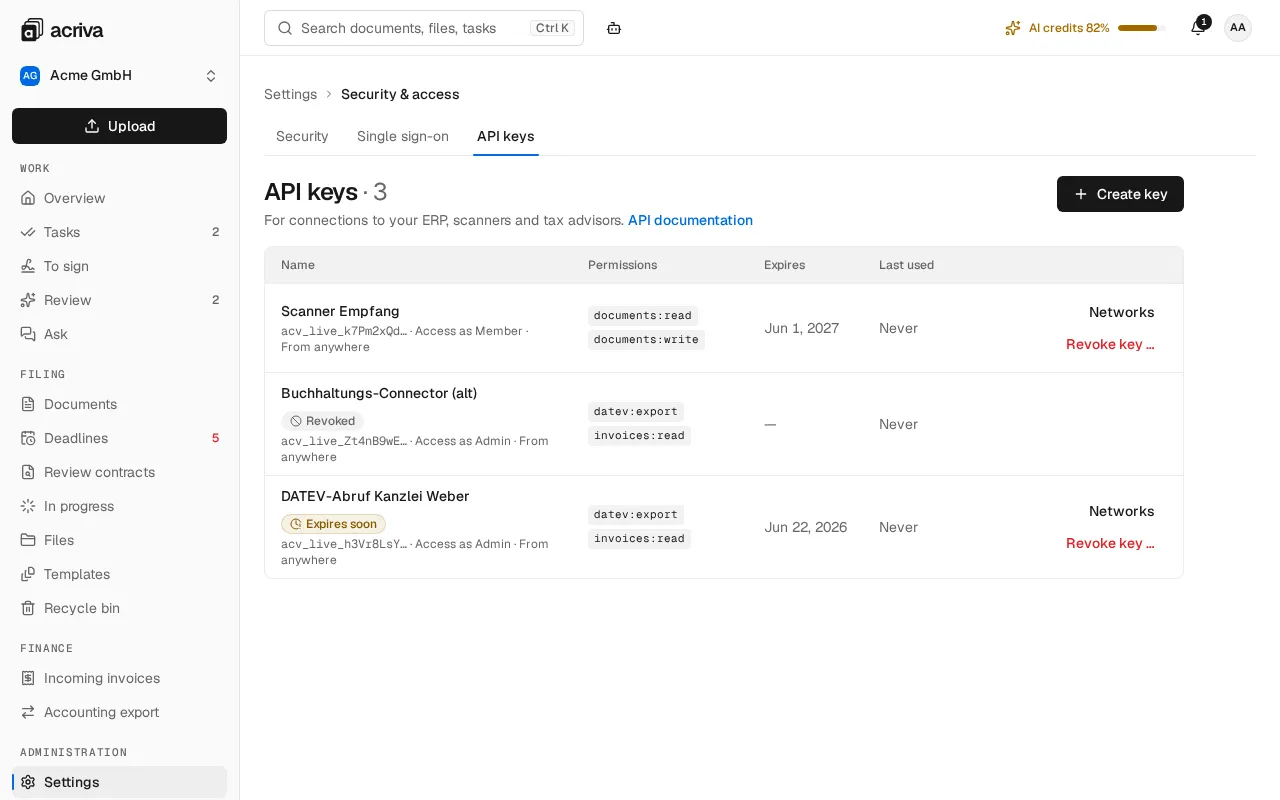
Create a key
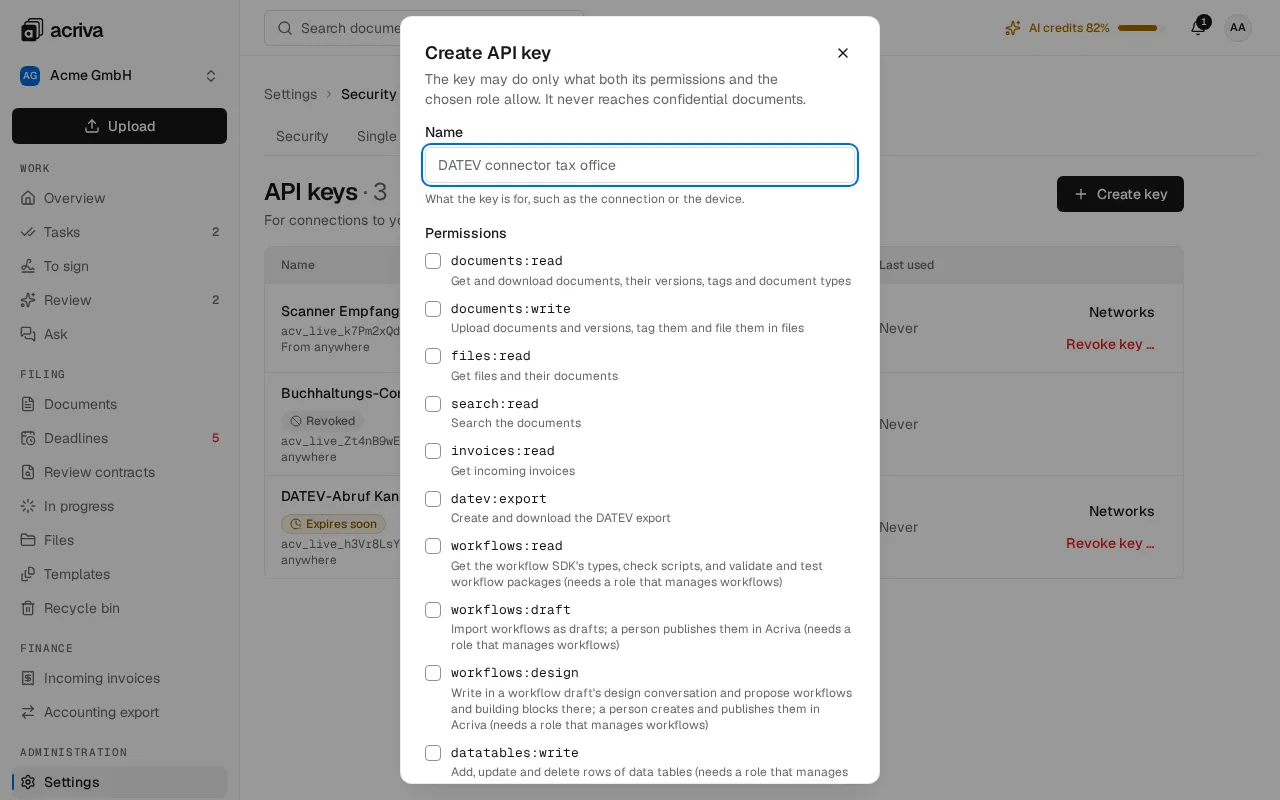
Section titled “Create a key”- Select Create key.
- Under Name, say what the key is for, such as the connection or the device.
- Under Permissions, tick what the key may do (see below).
- Under Access as role, choose the role whose documents the key reads and writes. Member is preselected. A key never gets more than your own role.
- Under Expires, choose when the key ends: in 30 or 90 days, in one year or in two years.
- Select Create key.
Acriva shows the key once, in the dialog Key “…” created. Select Copy and store the key in
your system’s secret store. Tick I have stored the key safely. and select Done. Acriva keeps
only a fingerprint of the key: if it gets lost, revoke it and create a new one. The list shows the
start of each key (acv_live_…) to tell them apart.
A workspace has at most 50 working keys; a revoked or expired key frees its place.
Permissions
Section titled “Permissions”A key may do only what both its permissions and its role allow. It never reaches a confidential document, and it can’t complete a task or approve anything.
| Permission | What it opens |
|---|---|
documents:read |
Get and download documents, their versions, tags and document types |
documents:write |
Upload documents and versions, tag them and file them in files (Akten) |
files:read |
Get files (Akten) and their documents |
search:read |
Search the documents |
invoices:read |
Get incoming invoices |
datev:export |
Create and download the DATEV export |
workflows:read |
Get the workflow SDK’s types, check scripts, and validate and test workflow packages (needs a role that manages workflows) |
workflows:draft |
Import workflows as drafts; a person publishes them in Acriva (needs a role that manages workflows) |
workflows:design |
Write in a workflow draft’s design conversation and propose workflows and building blocks there; a person creates and publishes them in Acriva (needs a role that manages workflows) |
datatables:write |
Add, update and delete rows of data tables (needs a role that manages data tables) |
The workflow permissions are for CI jobs and agents. They need a role under Access as role that
manages workflows, such as Admin, and no key publishes, pauses or deletes a workflow, or creates a building block
of the design conversation (Design in the conversation).
A key with workflows:draft or workflows:design can’t also read documents, files, the search or invoices. Give agent and CI keys
only the workflow permissions: a key that also reads documents reads them wherever the agent runs.
The permission datatables:write fills data tables from your own systems (below).
The key’s role under Access as role needs the permission Create and change data tables, their columns,
uploads and rows, such as Admin; Acriva refuses to create the key with a role without it.
Send the key with a request
Section titled “Send the key with a request”Send the key in the Authorization header on every request to your workspace’s API:
curl "https://<acriva-host>/api/v1/t/<tenant>/documents" \ -H "Authorization: Bearer acv_live_…" \ -H "Accept-Language: en"- A key belongs to one workspace. On another workspace’s address it gets
404, as for a workspace that doesn’t exist. - An expired or revoked key gets
401with the codeapi-key-expiredorapi-key-revoked. Without the public API in the plan, and while the workspace is suspended, every key gets404. A key that doesn’t exist gets404too; a value that isn’t shaped like a key (acv_live_and 40 letters and digits) gets401without a code. - An endpoint the key’s permissions don’t open answers
403with the codeapi-key-scope. The API reference marks the endpoints a key can call. - A key that names networks (below) gets
403with the codeapi-key-network-not-allowedfrom any other address. - Every change a key makes, and every document it views or downloads, is in the audit log, with the key as the actor: “API key” and its name.
Fill data tables
Section titled “Fill data tables”A key with datatables:write keeps a data table of your workspace up to date from your own system,
for example the vendors from your ERP (how data tables work). Data tables come with the Business and Enterprise plans and the trial: without them, every request gets 404
with the code datatables-off. The page of a table in the app shows its address under Fill through
the API. Two requests write rows, and each changes all of its rows or none:
| Request | What it does |
|---|---|
PUT /api/v1/t/<tenant>/data-tables/<table>/rows |
Adds or updates rows by their key: {"rows": [{…}, …]}. A row names the key column and the columns it sets; a column it leaves out keeps its value, null empties it. |
POST /api/v1/t/<tenant>/data-tables/<table>/rows/delete |
Deletes the rows with the given keys: {"keys": ["…", …]}. A key without a row is passed over. |
A row names its columns by their keys, not their labels. Text is a JSON string, a number or an amount
a JSON number, a date a string such as 2026-10-23 or 23.10.2026, and yes/no true or false. The
answer counts the rows: {"inserted": 1, "updated": 1, "deleted": 0}. Every write that changes rows is
in the audit log with its counts and the key as the actor, never with the rows’ keys or values.
An example with the table lieferanten and its key column lieferantennr: the body is in a file, so a
retry sends it byte for byte again.
{ "rows": [ { "lieferantennr": "K-70011", "name": "Büro Schmidt KG", "zahlungsziel": 30 }, { "lieferantennr": "K-70012", "name": "Malerbetrieb Stein", "zahlungsziel": null } ]}write_id=$(uuidgen) # one key per write; a retry of this write sends it againcurl -X PUT "https://<acriva-host>/api/v1/t/<tenant>/data-tables/lieferanten/rows" \ -H "Authorization: Bearer acv_live_…" \ -H "Content-Type: application/json" \ -H "Idempotency-Key: $write_id" \ --data-binary @rows.jsonThe Idempotency-Key
Section titled “The Idempotency-Key”Every write with a key carries the header Idempotency-Key: 1 to 128 printable ASCII characters,
new for each write, such as a UUID. Without it a key’s request gets 400 with
idempotency-key-required, with an invalid one 400 with idempotency-key-invalid. In the app,
Acriva sends one with every deletion by key.
- Lost answer: when a request timed out or the connection broke, send it again with the same key.
Within 24 hours Acriva answers the first request’s result again, with the header
Idempotent-Replayed: true, and writes nothing. That holds for its refusals too (400for a row’s error,404,409table-quota). - The identical bytes: the key belongs to the table and to the exact bytes of the body. Resend the
body you sent as it is, and don’t serialise it again: the same key with another body, even if only
its whitespace or the order of its properties differs, or on another table, gets
409withidempotency-key-reusedand writes nothing. - Still being written: while the first request with the key runs, a second one gets
409withidempotency-key-in-flight. Wait for the first answer, or send it again after a moment. - Refused before writing: a request refused for its header, or for its body’s shape or size (a
400withouttable-import-invalid,413,415), by the rate limit (429), because the table’s columns changed meanwhile (409table-changed) or because Acriva was busy (503) keeps nothing; send it again with the same key. A400withtable-import-invalidis different: it is kept, and a retry under the same key answers the same row errors. Correct the rows and send them with a new key. - After 24 hours a key is free again: the same key then writes anew.
Limits and answers
Section titled “Limits and answers”A request holds at most 1,000 rows or keys and 2 MB. A key may send 60 writes of data tables a minute, both requests together.
| Status | Code and meaning |
|---|---|
200 |
Written: the counts inserted, updated and deleted. |
400 |
Nothing written. table-import-invalid: rows have errors; errors lists the first 100 with row (the row’s place in rows, counted from 0), column, code and message, and errorCount counts the rows with one. A deletion lists its keys’ errors under keys[0], keys[1] … with errorCount. Also more than 1,000 rows, a body of another shape and the Idempotency-Key codes. |
404 |
The workspace has no table with this key, or no data tables (datatables-off). |
409 |
Nothing written. idempotency-key-reused, idempotency-key-in-flight, table-changed (the table’s columns changed meanwhile; send the request again), or table-quota: the new rows would exceed your plan’s rows (used, allowance). |
413 |
request-too-large: the body is larger than 2 MB. |
415 |
The body isn’t JSON (Content-Type: application/json). |
429 |
More than 60 writes a minute; wait the seconds of Retry-After. |
503 |
datatables-busy: another import or write of the workspace held the turn. Wait the seconds of Retry-After and send the request again with the same key. |
Rate limits
Section titled “Rate limits”A key may send 600 requests a minute, 60 of them uploads, and 60 script checks, 20 workflow test runs,
10 workflow imports and 60 writes of data tables. Beyond that, Acriva answers 429 with a
Retry-After header: wait that many seconds and try again. After 20 refused keys a minute from the
same address for one workspace, or 100 across all workspaces, Acriva answers 429 too, with
Retry-After.
A key that calls the addresses of many workspaces it doesn’t belong to is suspended for a while:
for 15 minutes, and for 24 hours when it happens again within a day. Meanwhile it gets 403 with the
code api-key-suspended and Retry-After. A repeated case tells the workspace’s admins in the app and
by email, and so does a key used from a country it wasn’t used from in the last 30 days.
Limit a key to networks
Section titled “Limit a key to networks”A key works from anywhere until you name the networks it may come from. Enter them under Networks
when you create the key, or later with Networks in the key’s row on the page API keys: one
network or address per line, IPv4 or IPv6, at most 10, such as 203.0.113.0/24 or 2001:db8::/48. A
single address counts as itself. Acriva stores each network in its usual form (203.0.113.7/24
becomes 203.0.113.0/24) and refuses a value that is no address or network. Only public networks are
allowed: Acriva refuses private, shared and reserved ranges such as 10.0.0.0/8, 192.168.0.0/16,
100.64.0.0/10 or fd00::/8, and ranges that hold one of them (such as 0.0.0.0/0), since no client on
the internet comes from them.
- From any other address the key gets
403with the codeapi-key-network-not-allowed, and the audit log shows “API key refused outside its networks” with the address, at most once a minute per key and network. - Empty the field to let the key work from anywhere again. Every change shows in the audit log as “API key’s networks changed”.
- If someone changed the key meanwhile, Save answers that it was changed; reload the page and enter the networks again.
Revoke a key
Section titled “Revoke a key”- On the page API keys, select Revoke key … in the key’s row.
- Confirm with Revoke.
Requests with the key are refused at once; this can’t be undone. When a member who created keys is removed, their keys are revoked with the membership, and a role change revokes the keys that go beyond the new role (Members).
When a key is misused and nobody in the workspace can be reached, the Acriva team can revoke exactly that one key during a security incident instead of suspending the whole workspace. Everyone who manages API keys then gets a notification and an email, and the audit log records the revocation with “(Acriva)” after the key’s name. If the integration still needs access, create a new key; the revoked one stays revoked.